

Blog / FAQs

How-To Guide to Toyota Full-Speed Range Dynamic Radar Cruise Control

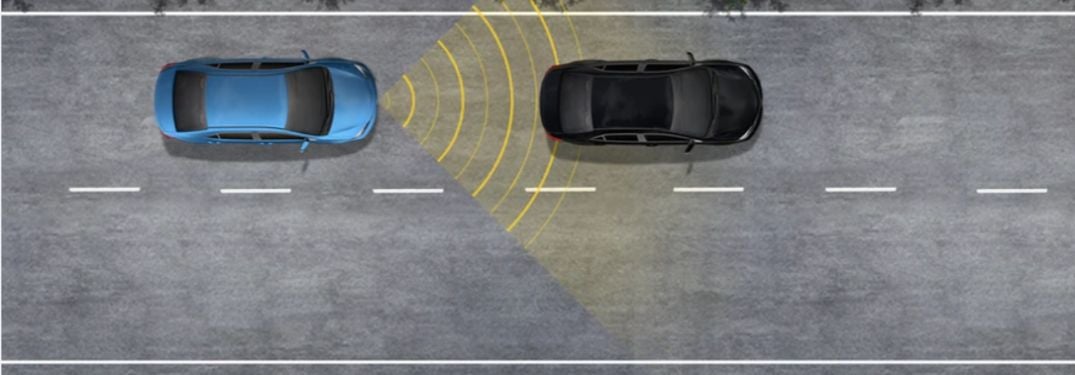
Graphic of Toyota Dynamic Radar Cruise Control

How To Use Toyota Dynamic Radar Cruise Control 

Do you find yourself driving on the highway a lot? Do you love to set the cruise control and enjoy the ride? Equipped with Toyota Safety Sense™ 2.0 and Full-Speed Range Dynamic Radar Cruise Control, models like the 2020 Toyota RAV4 provide unrivaled and award-winning safety at every turn. Familiarize yourself with the ins and outs of Dynamic Radar Cruise Control with this quick how-to guide on how to use Toyota Dynamic Radar Cruise Control. Visit the Earnhardt Toyota inventory today to find a vehicle equipped with Full-Speed Range Dynamic Radar Cruise Control! 


READ MORE: How To Use Toyota Smart Key with Push Button Start 


Step-By-Step Instructions To Use Toyota Dynamic Radar Cruise Control 

  1. Press the Dynamic Radar Cruise Control Button on the Steering Wheel 
  2. Press SET When You Reach Your Desired Speed 
  3. Press +RES to Increase Your Speed by 1 MPH 
  4. Press –SET to Decrease Your Speed by 1 MPH 
  5. Press the Vehicle-to-Vehicle Distance Button to Adjust Following Distance 
  6. Press CANCEL to Cancel Cruise Control 
  7. Press +RES to Resume Cruise Control and Return to Set Speed 
Posted in:

Related Posts

Step-By-Step Instructions to Toyota Audio Multimedia Streaming

How To Use Toyota Integrated Streaming Next-generation Toyota models – like the 2022 Toyota Tundra – employ the latest Toyota Audio Multimedia infotainment system that provides families with a wide range of upgrades. Integrated Streaming is a key upgrade to the Toyota resumé that uses Toyota Wi-Fi Connect to provide access to streaming services like Apple Music and Amazon Music via the touchscreen display. Learn how to use Toyota Integrated Streaming with this quick step-by-step guide created by Earnhardt Toyota in Mesa, AZ. Contact the dealership today to test drive a 2022 Toyota Tundra and experience the next-gen multimedia system firsthand! How-To Guide to Toyota Integrated Streaming Download the Toyota App on Your Smartphone and Register Your Vehicle Activate Your Toyota Wi-Fi Connect Subscription Access Account Settings on the Toyota App Select Linked Accounts on the List of Options Select the Streaming Services You Would Like to Link Sign-In with Your Account Credentials READ MORE: How To Use Waze Navigation in Your Toyota

2022 Toyota Tacoma Interior with Navigation on Touchscreen Display

Step-By-Step Instructions to Waze Navigation with Toyota Apple CarPlay and Android Auto

How To Use Waze Navigation in Your Toyota Did you know that your new Toyota Tacoma provides access to a lot of your favorite apps with Apple CarPlay and Android Auto capabilities? Toyota Entune™ multimedia will keep you connected and Apple CarPlay and Android Auto will help you find your way with the popular Waze Navigation app. Learn how to use Waze Navigation in your Toyota with this quick step-by-step guide and video provided by Earnhardt Toyota in Mesa, AZ. Find and test drive a Toyota car, truck or SUV today that will keep you connected to your favorite mobile apps! How-To Guide to Toyota Waze Navigation Ensure that Your Smartphone is Compatible with Apple CarPlay or Android Auto Install the Waze Navigation App on Your Smartphone Connect Your Smartphone with Apple CarPlay or Android Auto in Your Toyota Launch Apple CarPlay or Android Auto on the Toyota Touchscreen Display Select the Waze Navigation Icon Select the Search Bar to Find a Location or Destination Select the Microphone Icon on the Waze Navigation App to Use Voice Search READ MORE: Which Toyota Models Are Available with Apple CarPlay in Mesa AZ?

Baby Sleeping in a Car Seat

Step-By-Step Instructions on How To Install a Car Seat in Your Toyota

How To Install a Child Car Seat in a Toyota Car, Truck or SUV Are you a new mom or dad in the Mesa, Chandler and Gilbert area? Installing a child car seat in your brand-new 2022 Toyota Sienna can be intimidating the first time you try and we are here to help at Earnhardt Toyota in Mesa, AZ. Learn how to install a child car seat in a Toyota car, truck or SUV with this quick step-by-step guide and how-to video. Contact the Earnhardt Toyota team today to schedule a test drive in a brand-new Toyota! How-To Guide to Child Car Seats in Your Toyota Check Your Toyota Owner’s Manual for Model-Specific Instructions Clear Any Accessories From the Rear Seats Place the Car Seat on the Seat in Your Toyota Adjust the Seatback to Ensure it is Tight to the Seat Run the Seatbelt Through the Belt Path and Buckle Pull on Seatbelt to Lock and Remove Slack Check for Less than 1” of Movement Attach the Rear Tether Strap to the LATCH System on the Back of the Seat READ MORE: How To Use Toyota Smart Key® with Push Button Start